Introduction
Shellbin is a microservice architecture project that I built to exercise my understanding of CI/CD for microservice applications.
It’s named shellbin because it’s a pastebin clone that you can access with your shell using Unix pipes and the netcat utility (example below).
cat $FILE | nc <www.shellbin.address>
The product is intentionally simple. It’s just a pastebin clone, so we can think about the DevOps aspects without worrying too much about the product implementation.
Technical Overview
- Decoupled microservices running on Kubernetes
- There are four total container images involved in shellbin
- Three containers run custom binaries built with Go, and one container is stock mysql
- The deployment pipeline is based on ArgoCD, GitHub Actions, and GHCR
There are two repos involved in building and deploying shellbin:
england2/shellbin- Contains both application source code and templating/build files (Dockerfiles and Helm chart)
- Builds and pushes the container images to GHCR via GitHub Actions
- Defines how the application is deployed onto Kubernetes via Helm
- Pipeline deployment step talks to the ArgoCD repository
england2/cluster-repo- Is the main GitOps repository for my local cluster
- Holds general cluster configuration in addition to
shellbinrelated configuration - Declares the desired state of the Kubernetes cluster, and state is enforced by ArgoCD
- Exposes
shellbinconfiguration plainly, allowing for a simpler multi-repo deployment pipeline
Source code
The good stuff right up front.
Here’s the shellbin source code, and here’s the cluster-repo source code.
Shellbin Project Structure
  flowchart LR
    Browser[Browser / HTTP client]
    Netcat[Netcat / TCP client]

    subgraph K8s["Kubernetes"]
      WS[webserver<br/>Gin on :4747<br/>Service port 80]
      NC[nc-server<br/>TCP on :6262<br/>Service targetPort 6262]
      DB[db-service<br/>Gin on :7272<br/>Service port 80]
      MYSQL[(MySQL)]
    end
    class K8s k8slabel
    classDef k8slabel color:#ffffff

    Browser -->|GET /, GET /paste/:path, POST /submit| WS
    Netcat -->|TCP paste content| NC

    WS -->|HTTP POST /processInput| DB
    WS -->|HTTP POST /servePaste| DB
    NC -->|HTTP POST /processInput| DB

    DB -->|SQL queries to pastes table| MYSQL
The project has 4 distinct services:
webserver- provides web interface to create and view posts
- communicates with
db-servicefor database operations
nc-server- provides netcat server to create pastes from the command line
- communicates with
db-servicefor database operations
db-service- shared database layer provided to
webserverandnc-server
- shared database layer provided to
mysql- a stock mysql container as the database
- manages data as a simple statefulSet with a persistentVolumeClaim
How does the CI/CD work?
ArgoCD
First, let’s cover ArgoCD. ArgoCD is a declarative GitOps system for Kubernetes. This means that it uses a git repo as a “source of truth”, and reconciles the cluster state to match the yaml/state that’s defined in the repo.
Here’s a basic example:
- ArgoCD is configured to watch a certain folder named
test-dirthat exists in a git repo. - In
test-dir, I define a Kubernetes resource calledtest-deployment.yml. - I commit and push this change to the git repo.
- ArgoCD detects this change and creates this resource automatically!
And here are some additional details that come into play with this project.
- ArgoCD can be configured to watch a folder in any repository, not just the main cluster configuration repo.
- ArgoCD can be configured to watch a folder representing a full Helm chart (and deploy it as such), not just separate yaml files.
- ArgoCD can select a different Helm values.yml chart than what is shipped in the default Helm release.
This helps us define the shellbin deployment agnostically. Its deployment is not tied to ArgoCD, and anyone with Helm can deploy it.
ArgoCD allows for deployment of related Kubernetes resources using what it calls an “Application”. The following is a snippet of our ArgoCD Application definition along with relevant comments.
# ...
  sources:
    # Select the `shellbin` repo as a source.
    - repoURL: git@github.com:england2/shellbin.git
      # Deploy from the default branch (main).
      targetRevision: HEAD
      # `path: helm` refers to the `helm` folder in england2/shellbin, which is the
      # folder where our shellbin Helm chart lives
      path: helm
      # Configuring this ArgoCD Application to template and deploy a Helm chart.
      helm:
        releaseName: shellbin
        valueFiles:
          # Here we tell ArgoCD to ignore the default Helm values, and use one defined in the
          # `cluster-repo` repository (the same repo that this file exists in).
          - $cluster-repo/argocd-reconciled-yaml/applications/shellbin/helm-values-shellbin.yml
      # Here we enable the $cluster-repo reference that's used above, allowing us to refer to
      # files in `cluster-repo` rather than `shellbin`.
    - repoURL: git@github.com:england2/cluster-repo.git
      targetRevision: HEAD
      ref: cluster-repo
To review:
- ArgoCD watches the
helm/directory in the shellbin repository for any changes - When ArgoCD finds a difference between the current shellbin deployment and what is defined in a watched folder/repo, it updates the cluster.
- We define a separate Helm values file than what
shellbinships with
The actual pipeline
We’ve established that our cluster is watching the Helm chart that shellbin defines, and any pushed changes will be reconciled by the cluster.
However, Helm only acts as a YAML templating engine for our application’s YAML.1 It doesn’t help us build container images or inform the cluster that there are new ones available.
Therefore, our shellbin pipeline still needs to:
- Build and push our container images
- Tell our cluster to use the new images
Build and push our container images
Building and pushing pure Go images is super simple, especially when using GHCR.
The full pipeline.yml is very easy to read, so I can recommend just checking that out.
Moving on, here’s a thought process on designing our pipeline:
- The build and deployment pipeline of
shellbinrelies on two separate repos - The exact state of our Go binaries is determined by our shellbin repo
- Therefore, we should tag new images using the SHA of the commit that built them
This way, we can always see what code is actually running in a binary by checking out that commit in the main branch of shellbin. While ArgoCD can determine if our cluster’s manifests are desynchronized, it certainly can’t do the same for a binary. This solution lets us confirm exactly what is deployed.
Explaining the Pipeline
Here’s a snippet of shellbin’s pipeline.yml that shows the step that builds, tags, and pushes our images to the registry.
# (shellbin) pipeline.yml snippet
# ...
      - name: Build and push
        uses: docker/build-push-action@v6
        with:
          # Using a matrix for parallel builds and code reuse
          context: ${{ matrix.container_dir }}
          file: ${{ matrix.container_dir }}/Dockerfile
          push: true
          tags: |

           # Here is where we tag the image with the current git commit sha
            ${{ env.IMAGE_REPO }}:${{ matrix.image_tag }}-${{ github.sha }}
           # Update the base image tag; this way that refers to an unspecific image will
           # still get the most recent image we built.
            ${{ env.IMAGE_REPO }}:${{ matrix.image_tag }}
          cache-from: type=gha,scope=${{ matrix.image_tag }}
          cache-to: type=gha,mode=max,scope=${{ matrix.image_tag }}
This handles the current-commit-SHA logic that was discussed above.
Now let’s jump back to cluster-repo and look at part of helm-values-shellbin.yml.
We can see where we define the images that our shellbin deployment actually uses:
# (cluster-repo) helm-values-shellbin.yml snippet
# ...
webserver:
  replicaCount: 1
  name: webserver
  image:
    repository: ghcr.io/england2/shellbin
    pullPolicy: IfNotPresent
    # Here is where we define the specific image we deploy for each microservice.
    # It's this line that we have to change to inform the cluster to grab a new image.
    tag: webserver-60b47cf062ab5455cd1330ee952dc9c1f07229bd
# And 2 more microservice configuration blocks below...
Because helm-values-shellbin.yml is configured as a dependency of our shellbin Chart, whenever helm-values-shellbin.yml changes in the HEAD branch, ArgoCD will re-template the full shellbin chart and redeploy as necessary.
The line tag: webserver-60b47cf062ab5455cd1330ee952dc9c1f07229bd is where we tell ArgoCD which image we use.
The next steps of our pipeline are:
- check out
cluster-repo - change the image SHAs of our services in the Helm values file
- commit the changes and push to
cluster-repo
Here’s step 2, where we alter image definition lines like tag: webserver-60b47... in helm-values-shellbin.yml shown above.
# (shellbin) pipeline.yml snippet
# ...
        with:
          cmd: >-
            yq -i
            '.webserver.image.tag = "webserver-" + strenv(IMAGE_SHA) |
            .dbservice.image.tag = "dbservice-" + strenv(IMAGE_SHA) |
            .ncserver.image.tag = "ncserver-" + strenv(IMAGE_SHA)'
            'cluster-repo/${{ env.VALUES_FILE }}'
Recall that the above change is affecting a checked-out instance of england2/cluster-repo’s source code inside our GitHub Actions runner.
For this change to propagate, we just need to commit and push our changes to england2/cluster-repo, and then ArgoCD will notice and apply them.
After we commit and push, here’s roughly what happens:
- ArgoCD polls for changes in the repos it’s configured to watch in application-shellbin.yml
- (that is,
england2/shellbinandengland2/cluster-repo)
- (that is,
- ArgoCD sees that there are new images defined in
helm-values-shellbin.yml - ArgoCD re-templates the full Helm chart using the new values files
- ArgoCD deploys the new yaml that points to our new images
- Kubernetes fetches the images from GHCR and deploys them
And with that, we have a working pipeline!
Demos
The remainder of this article provides some basic demos of the software.
Showing that pods are running container images tied to a certain git commit
# What image is our webserver running?
$ kubectl get po -o yaml webserver-c6b9f9495-w9rdh | rg 'image: '
    image: ghcr.io/england2/shellbin:webserver-911e4e7282cdd8ff045df05090f3302997d0d35a

# Okay, what does that commit do?
~/shellbin $ git show -s 911e4e7282cdd8ff045df05090f3302997d0d35a
commit 911e4e7282cdd8ff045df05090f3302997d0d35a (HEAD -> master, origin/master, origin/HEAD)
Author: te <elanengland@protonmail.com>
Date:   Sat Mar 21 07:42:23 2026 -0700

    helm: removed date from templates, which caused unnecessary de-sync in ArgoCD
Example pipeline run
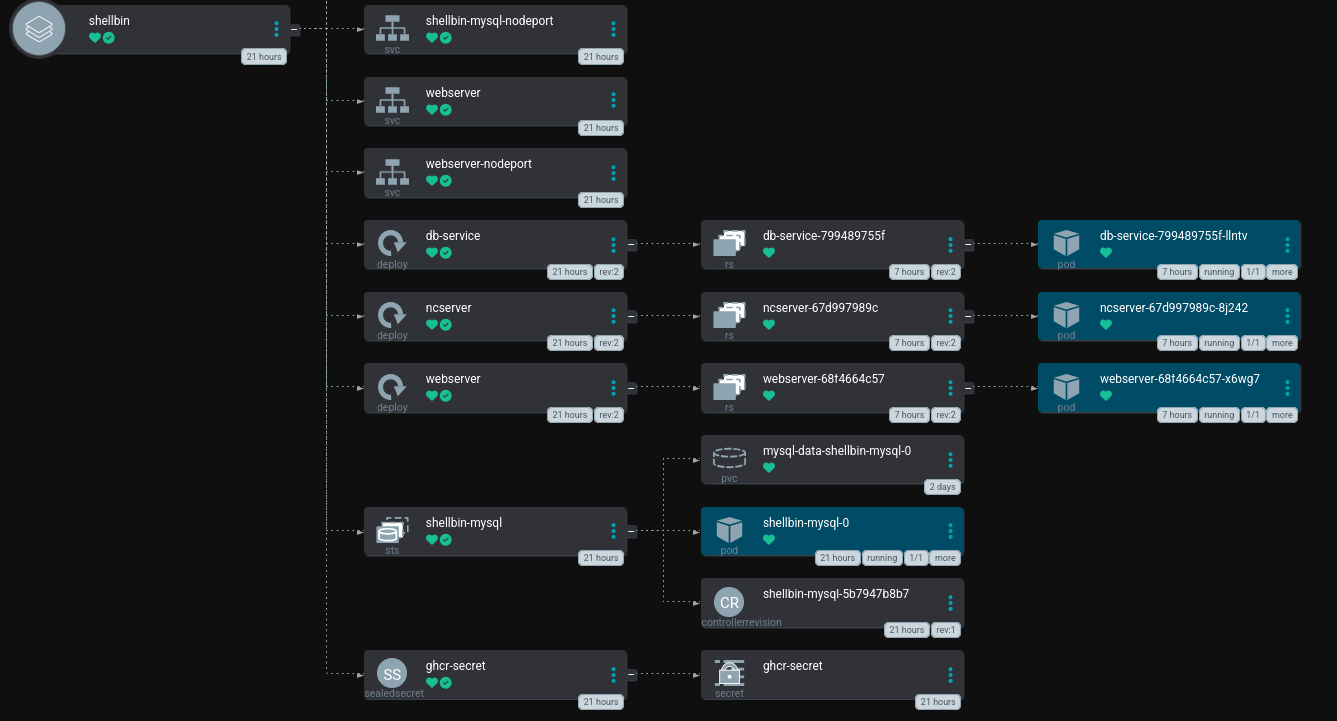
ArgoCD Application Deployment
Terminal Session
# creating a paste
~ $ echo "foobar" | nc "$K8S_IP" 31332
<server.address>/14758f1a

# checking it out
~ $ curl "$K8S_IP:31333/14758f1a" | rg foobar
  % Total    % Received % Xferd  Average Speed   Time    Time     Time  Current
                                 Dload  Upload   Total   Spent    Left  Speed
100   238  100   238    0     0   122k      0 --:--:-- --:--:-- --:--:--  232k
            <pre class="mono1">foobar
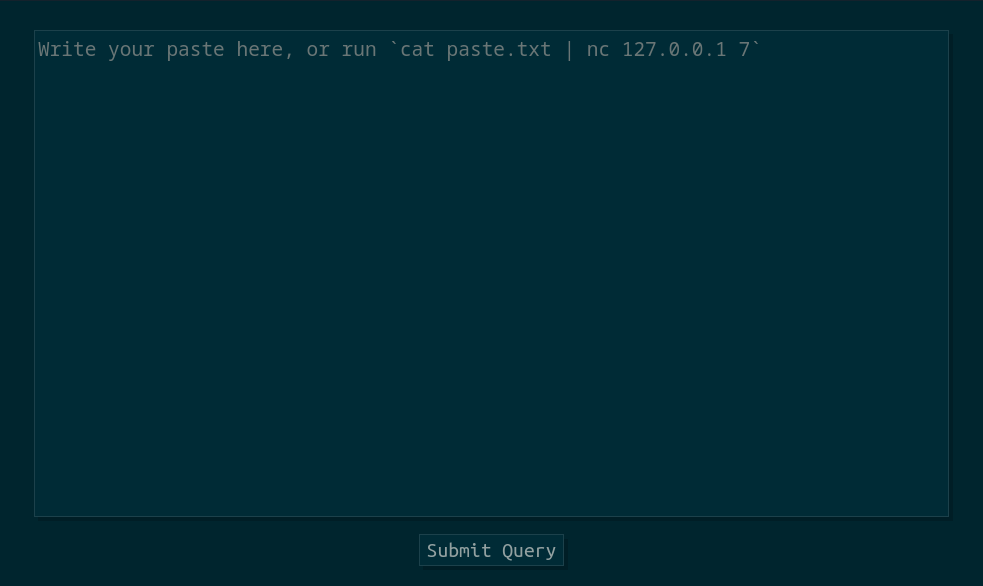
Web interface
In fact, we don’t even deploy a Helm Release. ArgoCD calls the Helm Templating engine to render yaml, and then deploys and manages the resulting resources itself. Therefore,
$ helm [upgrade|rollback|uninstall|etc] shellbinis an error, as there isn’t ashellbinHelm Release on the cluster. ↩︎